TL;DR: I picked up a Cheapino from AliExpress to see if budget splits are worth it for people who can’t pull the trigger on a $200+ board. They are, with caveats.
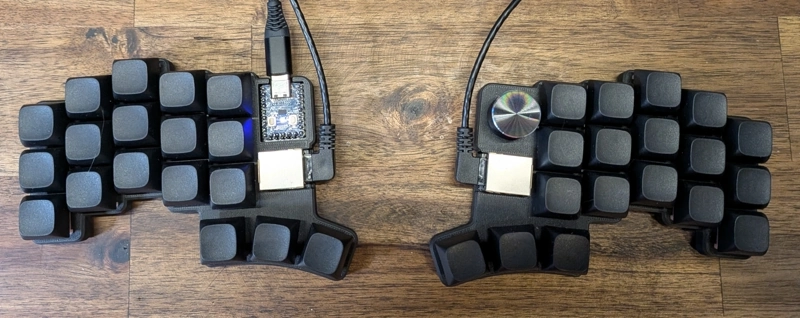
Update: The creator of the Cheapino, tompi, commented on the Reddit thread for this post. He confirmed what I suspected: the AliExpress sellers modified his case design to make it cheaper to produce - basically just left out the screws. If you want to see what a proper Cheapino build looks like, check out the community gallery.
Why This Post Exists
If you’re reading this, there’s a good chance you’ve spent hours looking at keyboard options online. You’ve seen the Corne, the Ferris, the Piantor, maybe even designed your own in your head. Then you look at the price and think… maybe later.
I get it. I wrote about my Piantor Pro and RSI journey earlier this year, and I’ve since added a Chocofi from Beekeeb to my collection. Leo also included a Toucan as a gift - expect a review of that soon. I’m keyboard rich. I didn’t need another board.
Then AliExpress sent me one of those “items you viewed” discount emails. Something like 50% off a Cheapino. I’d been eyeing it anyway, so I grabbed one.
To be clear: the Cheapino is an open source design. You can build one yourself, order a kit, or buy a pre-built from various vendors. I went with the absolute cheapest pre-built option I could find on AliExpress.
The damage: ~$55 total (keyboard + shipping, heavily discounted)
The wait: ~1 month from China
For reference, if I ordered the same keyboard today it would be around $80. So if you need a keyboard now and can’t wait for a sale, that’s closer to what you’ll pay.
From what I’ve read, The Cheapino was originally designed as a DIY project with cost as the primary constraint - hence the name. The goal was a split ergo you could build yourself for as little as possible. Whether you can still build one cheaper than what I paid for a pre-built unit, I’m not sure. PCBs, switches, an RP2040, diodes, and keycaps add up quickly.
The Learning Curve is Real (caveat)
A quick note if you’re intersted in diving into tiny keyboards
If Coding Were Natural has a great video about this: people order a crazy split keyboard hoping it will fix their RSI, use it for an hour, experience more pain, and give up.
This is normal. Any time you change your keyboard layout, you start using your muscles differently. It’s like working out for the first time in years. You will be sore. That’s not the keyboard failing you. That’s adaptation.
The Cheapino Package
The package arrived with:
- The keyboard (two halves)
- RJ45 cable to connect the halves
- Rubber stick-on feet (fit into the case design)
- Silent Peach v3 switches pre-installed
That’s it. No homing keys, no extra feet options, no documentation. Plug it in and figure it out.
There’s also a rotary encoder on the right half. It works as a scroll wheel out of the box. I didn’t have much luck using it. It’s too stiff to push with a single finger. Moreover, I already have scroll up/down on my mouse layer and can use that without moving my hands.
The Security Thing
Before using any keyboard from an unknown source, I reflash the firmware. A keyboard is a trusted input device. Malicious firmware could inject keystrokes or act as a keylogger.
The Cheapino uses an RP2040, which makes this easy:
- Hold the BOOT button while plugging in USB
- It appears as a USB mass storage device (can’t inject keystrokes in this mode)
- Drag your known-good firmware onto the drive
- Done
I compiled my own QMK firmware to match my Piantor Pro layout. The Cheapino isn’t in the official QMK repo, so there’s some extra setup. I also had to make a one-line fix for an API change, but nothing major.
Build Quality
The good:
- Switches feel great - honestly impressed. The Silent Peach v3s are smooth and quiet.
- PCB works fine
- USB-C connection is solid
- The case… exists
The not-so-good:
- Bottom plate is friction-fit and the right one falls off if you pick up the keyboard
- No homing keys - a real problem for touch typing on a new layout
- Fit and finish is “functional” at best
- The included RJ45 cable is a bit unruly
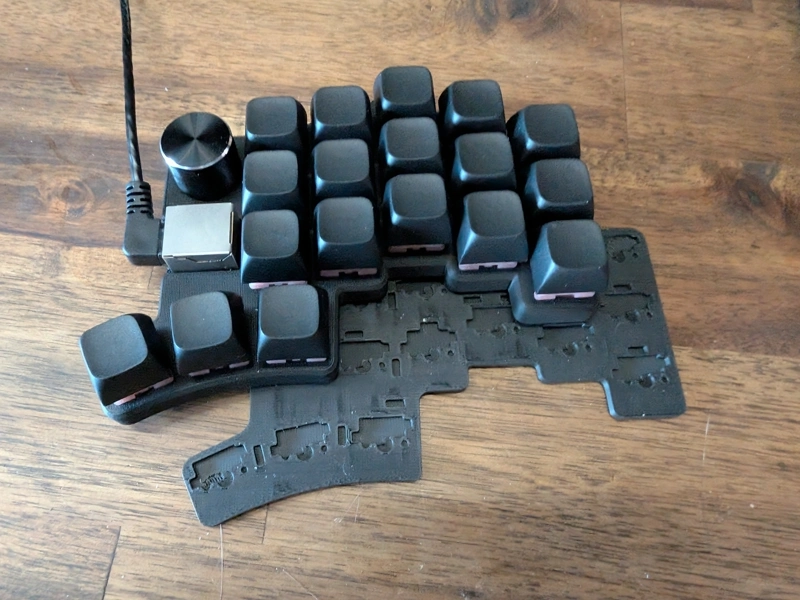
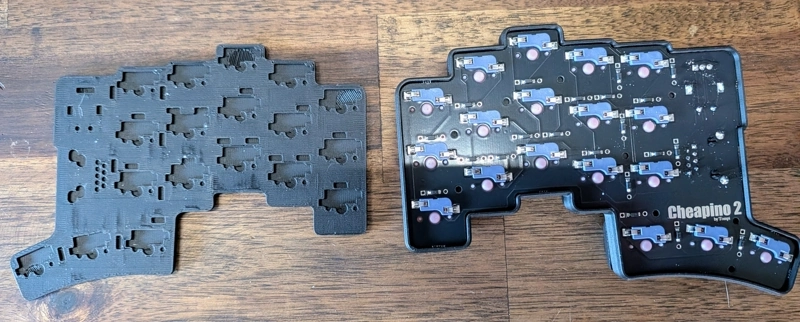
If the keyboard lives on your desk and never moves, none of this matters. If you want to travel with it, you’ll notice or you might want to glue it shut. There are no visible screw holes.
Comparing to Beekeeb
I have three boards from Beekeeb: a Piantor Pro, a Chocofi, and a Toucan. The difference is obvious.
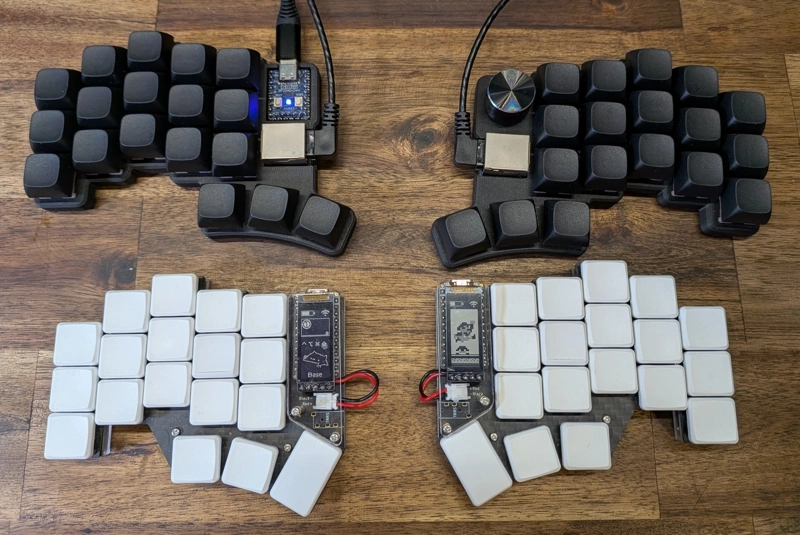
The Beekeeb Experience:
- Personal communication
- A photo of your finished keyboard before shipping
- Multiple feet options (different heights, materials)
- Proper homing keys
- Quality-checked before it leaves
- A lot of small things in the box you might need
What the AliExpress vendor ships:
- A keyboard and an RJ45 cable
The RP2040 on both boards runs the same QMK firmware. You’re not paying extra for better electronics. You’re paying for someone who cares about the details. Quality control. The small things that make daily use pleasant.
Learning to work with the firmware is crucial to enjoying minimal keyboards. Check out my Piantor Pro post for my layout, homerow mods setup, and the resources that helped me get there.
Notes on MX vs Choc Spacing
After adapting to Choc-spaced boards (Piantor / Chocofi), the Cheapino’s MX spacing feels off.
The column stagger is similar between boards - that part transfers fine. What doesn’t transfer is the thumb cluster position and the wider key spacing. MX caps are bigger, so the same layout takes up more space. My thumbs have to reach further.
I thought I wouldn’t like the thumb positions on the Chocofi/Corne style boards. I had to learn them. But now that I have, going back to the Cheapino’s thumb cluster feels like a step backward.
If you’re coming from a traditional MX keyboard, or even a larger split MX like the Moonlander, the Cheapino’s spacing might actually be easier to adapt to. The key size and spacing is familiar. You’re only learning the split layout, not fighting new key dimensions at the same time.
Keycaps Matter
On my Piantor Pro, I use KLP Lame keycaps. They have a scooped, contoured profile that guides your fingers into position. Learning to touch type on a 36-key layout with those caps was way easier than it would have been with flat caps.
Once I’d internalized the layout, switching to my Chocofi with standard Choc v1 keycaps was seamless. The muscle memory was already there.
The Cheapino comes with basic MX keycaps. No homing bumps, no scooped profile. For a first split keyboard, this makes the learning curve steeper than it needs to be.
I would maybe add some tactile bumps to the home row if you find yourself in this position.
Hand Size and Stagger
I found the Lily58’s stagger didn’t work for my hand size, though my typing position might have played a role too. Keys weren’t where my fingers naturally landed.
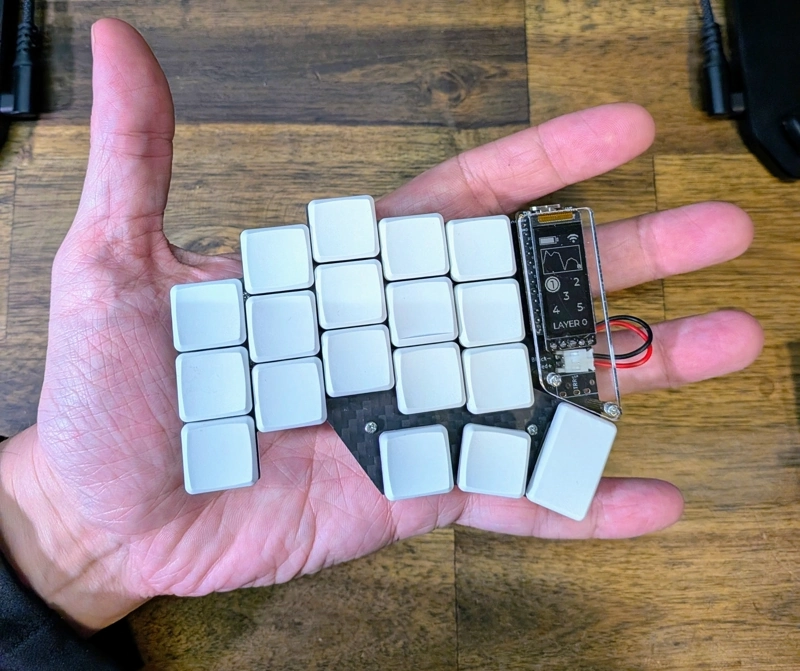
The Piantor’s more aggressive column stagger works better for me. The Cheapino’s stagger is actually pretty close, which is good news if you’re using it as a test run before committing to a Choc board.
Building Your Own
After posting this review, tompi shared some thoughts on the DIY route. Short version: you can beat the $55 AliExpress price, but only if you’re building two boards.
The math (approximate, without first-time discounts):
- PCBs from JLCPCB: ~$20 for 5 boards (minimum order), enough for 2.5 complete keyboards. Use “Global Direct Line” shipping to save on costs. First-time customers get significant discounts.
- Components: ~$20 for 2 complete boards
- Switches + keycaps: $30-40 for decent budget options
So you’re looking at roughly $35-40 per board if you build two. Not a huge savings over AliExpress, but you get the real case design and full control over the build.
If you have a 3D printer, tompi recommends printing the official case at 100% infill for better sound and feel. It uses 9 screws per side to sandwich the top and bottom together - far sturdier than the friction-fit AliExpress version. You’ll need:
- 18x M2 brass heat-set inserts (4mm long, 3mm outer diameter)
- 18x M2 screws (~5mm long, countersunk head preferred)
The official case also has proper insets for rubber feet, keeping the height minimal.
Note: My Chocofi is slightly lower profile than the Cheapino. The Piantor and Toucan are both lower-profile than the Chocofi.
For full build documentation, see the Cheapino homepage.
Who This Is For
The Cheapino makes sense if you’re curious about split ergo but not ready to spend $200+. If you already like MX spacing. If the keyboard will live on your desk. If you’re comfortable flashing firmware.
Spend more on an artisan board if you want something that feels finished. If portability matters. If you’re going all-in on Choc spacing anyway.
The Bottom Line
The Cheapino works. For $55, you get a functional split keyboard that runs QMK. It’ll help you decide if this whole ergo thing is for you. For most people, this keyboard would be totally fine as a daily driver.
The gap between this and an artisan board is real, but it’s in the details. Once you’ve used a board from a builder like Leo at Beekeeb, you notice the difference. You’re paying for craft, attention to detail, and someone who gives a shit.
If you’re on the fence about split keyboards, the Cheapino is a great way to jump in. Building your own is technically the cheapest entry point, but if you’re not comfortable with soldering, a pre-built gets you there faster.
Resources
- My Piantor Pro review and RSI journey
- Beekeeb - where I got my Piantor Pro, Chocofi, and Toucan
- Cheapino GitHub - build guide and firmware
- QMK Firmware - open source keyboard firmware
Comments